Using a Gemma M0 from Adafruit, a Neopixel Jewel and an ALS (Ambient Light Sensor) my daughter and I build up this wearable as Disco Lights.
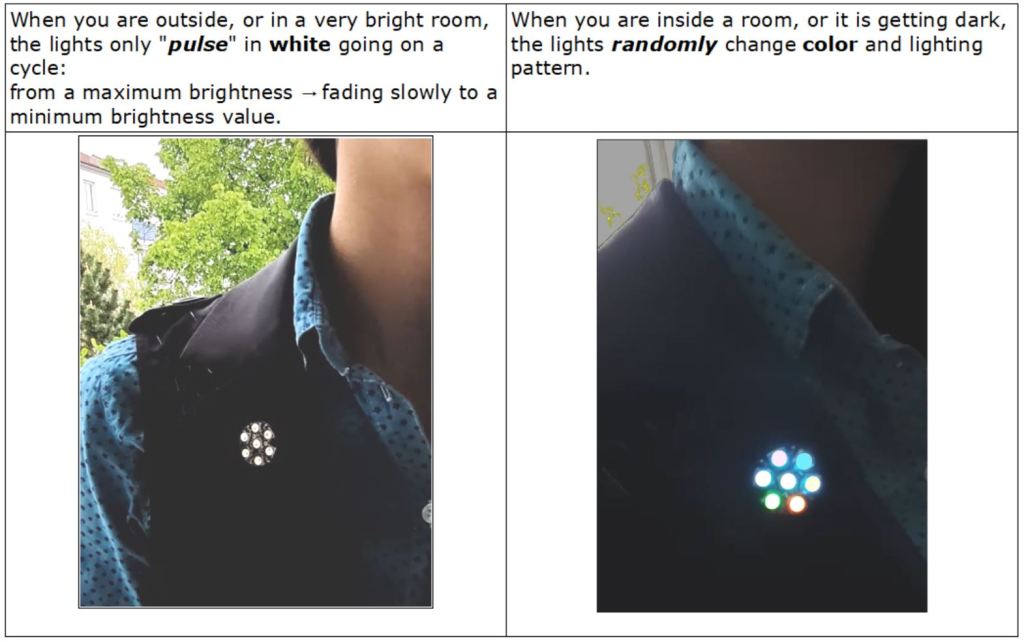
Here is a video:
MATERIALS:
° Ambient Light Sensor TEMT6000
° Conductive Thread to stitch all together on the garment.
We only use the value from the ALS: following the light intensity of the surroundings. The lights are not actually dancing to the music in this case. If you want to tinker dancing lights or LEDs that follow sound, you can visit this website:
LedFX LED Music Visualiser
CODE:
The program is written in the Arduino IDE, using the libraries for the NeoPixels from Adafruit:
#include <Adafruit_NeoPixel.h>#define temt6000Pin A2#define LEDring_pin 1#define LED_num 7#define BRIGHTNESS 30 // Set BRIGHTNESS Adafruit_NeoPixel Jewel = Adafruit_NeoPixel(LED_num, LEDring_pin,NEO_GRBW + NEO_KHZ800);uint32_t color = 0xFF08000; // Starting color = amberuint32_t RGB_value,G_value,B_value,R_value,valueSensor,old_value;int sensorLow = 1023;int sensorHigh = 0; void setup() { pinMode(temt6000Pin, INPUT); Jewel.begin(); Jewel.show(); Jewel.setBrightness(BRIGHTNESS); for(uint8_t i = 0; i < LED_num; i++){ Jewel.setPixelColor(i,color); Jewel.show(); delay(50); } //Serial.begin(9600); // Serial.println("calibrating..."); while (millis() < 5000) { // record the maximum sensor value valueSensor = analogRead(temt6000Pin); if (valueSensor > sensorHigh) { sensorHigh = valueSensor; } // record the minimum sensor value if (valueSensor < sensorLow) { sensorLow = valueSensor; } } }void loop() { valueSensor = analogRead(temt6000Pin); //Serial.println(valueSensor); RGB_value = map(valueSensor,sensorLow,sensorHigh,0,255); //if (old_value != valueSensor){ if (valueSensor < sensorHigh-70){ colorWipe(Jewel.Color(255,0,RGB_value), 30); colorWipe(Jewel.Color(0,RGB_value,0), 30); colorWipe(Jewel.Color(0,206,209), 30); // Turquoise whiteOverRainbow(85, 5); } else { pulseWhite(5); } //old_value = valueSensor; }}/************ ADAFRUIT Functions: *****************/void colorWipe(uint32_t color, int wait) { for(int i=0; i<Jewel.numPixels(); i++) { // For each pixel in strip... Jewel.setPixelColor(i, color); // Set pixel's color (in RAM) Jewel.show(); // Update strip to match delay(wait); }}void whiteOverRainbow(int whiteSpeed, int whiteLength) { if(whiteLength >= Jewel.numPixels()) whiteLength = Jewel.numPixels() - 1; int head = whiteLength - 1; int tail = 0; int loops = 3; int loopNum = 0; uint32_t lastTime = millis(); uint32_t firstPixelHue = 0; for(;;) { // Repeat forever (or until a 'break' or 'return') for(int i=0; i< Jewel.numPixels(); i++) { // For each pixel in strip... if(((i >= tail) && (i <= head)) || // If between head & tail... ((tail > head) && ((i >= tail) || (i <= head)))) { Jewel.setPixelColor(i, Jewel.Color(64, 224, 208)); // Set blue } else { // else set rainbow int pixelHue = firstPixelHue + (i * 65536L / Jewel.numPixels()); Jewel.setPixelColor(i, Jewel.gamma32(Jewel.ColorHSV(pixelHue))); } } Jewel.show(); // Update strip with new contents // There's no delay here, it just runs full-tilt until the timer and // counter combination below runs out. firstPixelHue += 40; // Advance just a little along the color wheel if((millis() - lastTime) > whiteSpeed) { // Time to update head/tail? if(++head >= Jewel.numPixels()) { // Advance head, wrap around head = 0; if(++loopNum >= loops) return; } if(++tail >= Jewel.numPixels()) { // Advance tail, wrap around tail = 0; } lastTime = millis(); // Save time of last movement } }}void pulseWhite(uint8_t wait) { for(int j=0; j<256; j++) { // Ramp up from 0 to 255 // Fill entire strip with white at gamma-corrected brightness level 'j': Jewel.fill(Jewel.Color(0, 0, 0, Jewel.gamma8(j))); Jewel.show(); delay(wait); } for(int j=255; j>=0; j--) { // Ramp down from 255 to 0 Jewel.fill(Jewel.Color(0, 0, 0, Jewel.gamma8(j))); Jewel.show(); delay(wait); }}
 MStronik
Hinterlasse einen Kommentar