My daughter and I made two interfaces for a theater play using two Circuit Playground Bluefruit from Adafruit and an additional NeoPixel Ring with 24 LEDs (also from Adafruit). The play was called Herzstillstand performed by the group Blue Art e.V.
All Circuit Playground boards already come with several built-in sensors, LEDs, and a buzzer, which makes it easier and faster to implement into your design. The Bluefruit comes with Bluetooth for wireless connectivity and there is an official App to control it. Additionally, like all the Circuit Playground series, you can program it using Arduino IDE as well.
The two interfaces:
I. Alarm activated by a certain position of the arm
The interface is used as an armlet and it should change the color of the LEDs depending on the position of the arm, for this we used the included accelerometer.
The interface should also have two different modes: one with an alarm that is activated when the arm reaches a certain position, and another without any alarm, which only changes color depending on the position.
The additional NeoPixel Ring lights up with a slight delay for a nice effect.
Pictures of the Bluefruit inside the case (also available from Adafruit) and a NeoPixel Ring attached on top of the case. The case has two slots on the back, where you can pass an armband through:
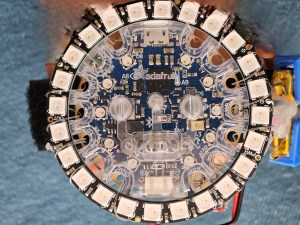
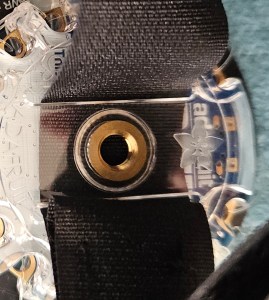
First mode (default): In this mode, the interface should change the color of the LEDs depending on the position of the arm. This mode is the default mode and you can come back to it by pressing the right push button of the Bluefruit:
After pressing the left push button the second mode is initiated: an alarm is activated by a certain position of the arm. Here is a video:
Code: Here is the code for the Arduino IDE:
/************ Bluefruit Interface accelerometer NeoPixel ******/#include <Adafruit_CircuitPlayground.h>#include <bluefruit.h>#include <Wire.h>#define NEOPIX_PIN A4#define NUM_PIXELS 24bool slideSwitch, flag_PB, right_state, right_lastState,left_state, left_lastState;float X, Y, Z;Adafruit_CPlay_NeoPixel strip = Adafruit_CPlay_NeoPixel(NUM_PIXELS, NEOPIX_PIN, NEO_GRB + NEO_KHZ800);void setup() { //Serial.begin(115200); CircuitPlayground.begin(); CircuitPlayground.setBrightness(70); CircuitPlayground.clearPixels(); strip.begin(); strip.clear(); strip.show(); flag_PB = false; right_state = false; right_lastState = false; left_state = false; left_lastState = false;}void loop() { slideSwitch = CircuitPlayground.slideSwitch(); if (slideSwitch){ X = CircuitPlayground.motionX(); Y = CircuitPlayground.motionY(); Z = CircuitPlayground.motionZ(); right_state = CircuitPlayground.rightButton(); left_state = CircuitPlayground.leftButton(); if (right_state != right_lastState){ if ((right_state) || (right_lastState)) { flag_PB = true; } else{ flag_PB = false; } } if (left_state != left_lastState){ if ((left_state) || (left_lastState)) { flag_PB = false; } else{ flag_PB = true; } } if (flag_PB) { getInclination(); } else{ getInclinationNoAlarm(); } /* Serial.print("X "); Serial.println(X); Serial.print("Y "); Serial.println(Y); Serial.print("Z "); Serial.println(Z); delay(100);*/ } else{ CircuitPlayground.clearPixels(); strip.clear(); strip.show(); } //delay(5); right_lastState = right_state; left_lastState = left_state;}/******* FUNCTIONS *********/void getInclination(){ uint8_t xlimit= abs(X); uint8_t ylimit= abs(Y); uint8_t zlimit= abs(Z); if ((xlimit>Y)&&(xlimit>Z)){ // arm is horizontal, frontal to the body if (zlimit >= ylimit){ setColor(0x0000FF); // blue or set your color here } else{ setColor(0x008686); //turquoise or set your color here } } else if ((ylimit>X)&&(ylimit>Z)){ // arm is vertical, down if (zlimit >= xlimit+1){ setColor(0x00FF00); //green or set your color here } else{ setColor(0xFFF700); //yellow or set your color here } } else if ((zlimit>X)&&(zlimit>Y)){ // arm is horizontal, sidewards if (Y >-3.5){ //&&(X < 3.0)){ alarmStart(1); } /*else if(Y+3>X){ setColor(0x8000AF); //Purple or set your color here }*/ else{ setColor(0x6A5ACD); //purple blue or set your color here } } //delay(5); }void getInclinationNoAlarm(){ uint8_t xlimit= abs(X); uint8_t ylimit= abs(Y); uint8_t zlimit= abs(Z); //CircuitPlayground.setBrightness(255); if ((xlimit>Y)&&(xlimit>Z)){ // arm is horizontal, frontal to the body if (Z >= Y){ setColor(0x0000FF); // blue } else{ setColor(0x007086); //turquoise } } else if ((ylimit>X)&&(ylimit>Z)){ // arm is vertical, down if (Z >= X){ setColor(0x00FF00); //green } else{ setColor(0xFFFF99); //canary yellow } } else if ((zlimit>X)&&(zlimit>Y)){ // arm is horizontal, sidewards if (Y> X){ setColor(0x4682B4); //steel blue } else{ setColor(0x9D00FF); //purple } } //delay(5); } void setColor(int chosenColor){ for (uint8_t i = 0; i < 10; i++) { CircuitPlayground.setPixelColor(i, chosenColor); } for (uint8_t j = 0; j < NUM_PIXELS; j++) { strip.setPixelColor(j, chosenColor); strip.show(); delay(20); //sets a delay btwn each pixel }}void setColorAlarm(int chosenColorAlarm){ for (uint8_t i = 0; i < 10; i++) { CircuitPlayground.setPixelColor(i, chosenColorAlarm); } for (uint8_t j = 0; j < NUM_PIXELS; j++) { strip.setPixelColor(j, chosenColorAlarm); } strip.show();}void alarmStart(int Duration) { int i; for (i=0;i<Duration;i++){ setColorAlarm(0xff0000); delay (70); setColorAlarm(0x000000); delay(70); CircuitPlayground.playTone(440, 100); }}
II. Activate the alarm via the Bluefruit App
For another scene the interface should light up on a cycle of green and blue until someone presses a button on the App that activates the alarm. Here is a link to the Adrafruit website.
Four different alarm durations or counts should be activated by the four buttons on the App’s interface. For this we used the Control Pad on the App:
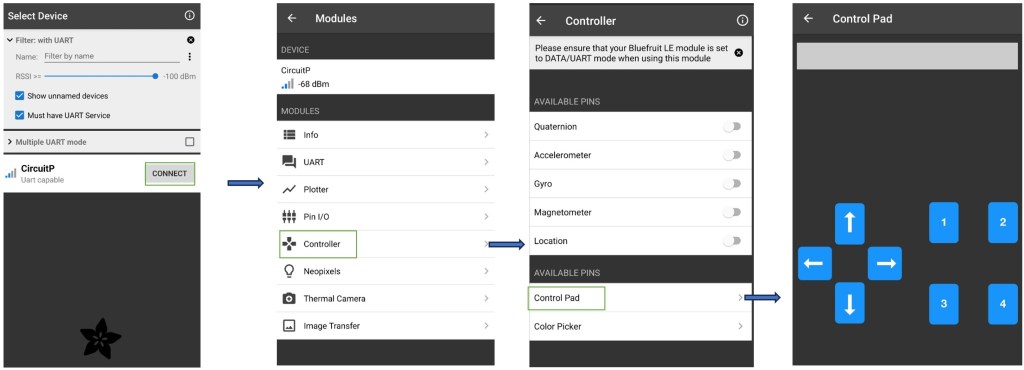
Code: here is the code for the Arduino IDE:
/****** Bluefruit Interface with App **********/#include <Adafruit_CircuitPlayground.h>#include <bluefruit.h>#include <Wire.h>// Define the button pin#define NEOPIX_PIN A4#define NUM_PIXELS 24#define PB1_Pin A3bool flag_count, flag_BT;Adafruit_CPlay_NeoPixel strip = Adafruit_CPlay_NeoPixel(NUM_PIXELS, NEOPIX_PIN, NEO_GRB + NEO_KHZ800);int PB1_Value;int PB1_State = 0;int last_PB1Val = 0;unsigned long lastDebounceTime = 0; // the last time the output pin was toggledunsigned long debounceDelay = 50; // the debounce time; increase if the output flickersint currentColor = 0;// Define service and characteristic for BLE UARTBLEUart bleUart;typedef struct { uint32_t primary; uint32_t secondary;} colorCombo;// Add or remove color combos here:colorCombo colors[] = { // Each color combo has the following form: // { .primary = 24-bit RGB color (use hex), .secondary = 24-bit RGB color }, // Make sure each combo ends in a comma EXCEPT for the last one! { .primary = 0x00FF00, .secondary = 0x00FFF0 }, // Green to turquoise { .primary = 0x0000FF, .secondary = 0x008686 }, // Blue to turquoise { .primary = 0x00FFDF, .secondary = 0x0000FF } // Green to blue};void setup() { //Serial.begin(115200); //Initialize Circuit Playground CircuitPlayground.begin(); CircuitPlayground.setBrightness(50); CircuitPlayground.clearPixels(); strip.begin(); strip.clear(); strip.show(); flag_count = true; flag_BT = false; // Configure the button pin as input pinMode(PB1_Pin, INPUT); // Initialize BLE Bluefruit.begin(); Bluefruit.setName("CircuitPlayground"); bleUart.begin(); // Start advertising BLE service Bluefruit.Advertising.addFlags(BLE_GAP_ADV_FLAGS_LE_ONLY_GENERAL_DISC_MODE); Bluefruit.Advertising.addService(bleUart); Bluefruit.Advertising.addName(); Bluefruit.Advertising.start(); //Serial.println("BLE initialized and advertising.");}void loop() { PB1_Value = digitalRead(PB1_Pin); // Check if the push button is pressed //debouncing if (PB1_Value != last_PB1Val){ lastDebounceTime = millis(); } if ((millis() - lastDebounceTime) > debounceDelay) { if (PB1_Value != PB1_State) { PB1_State = PB1_Value; if(PB1_State == HIGH){ flag_count = false; } if(PB1_State == LOW){ flag_count = true; } } } last_PB1Val = PB1_Value;switch (flag_count){ case true: break; case false: currentColor = (currentColor + 1) % (sizeof(colors)/sizeof(colorCombo)); lightShow(); break;} // Check for BLE commands from the appif (bleUart.available()) { String receivedCommand = ""; while (bleUart.available()){ char c = bleUart.read(); if (c == ';'|| c == '!'){ flag_BT= true; break; } else{ receivedCommand += c; } } //Serial.print("Received command: "); //Serial.println(receivedCommand); if (flag_BT){ if (receivedCommand.startsWith ("B")) { char buttonID = receivedCommand[1]; bool buttonState = receivedCommand[2] - '0'; if (buttonState){ switch (buttonID) { case '1': // button 1 alarmTone(2); // change to your desired function here flag_BT = false; break; case '2': // button 2 alarmTone(5); // change to your desired function here flag_BT = false; break; case '3': // button 3 alarmTone(10); // change to your desired function here flag_BT = false; break; case '4': // button 4 alarmTone(15); // change to your desired function here flag_BT = false; break; default: //Serial.println("Unknown command"); flag_BT = false; break; } } } } //-end of IF for flag_BT true receivedCommand =""; flag_BT = false; } // -end of IF for Bluetooth available /*if (!flag_count){ currentColor = (currentColor + 1) % (sizeof(colors)/sizeof(colorCombo)); lightShow(); } */ else{ CircuitPlayground.clearPixels(); strip.clear(); strip.show(); } }/******* FUNCTIONS *********/void lightShow(){fillPixels(secondaryColor());for (uint8_t i = 0; i < 10; i++) { CircuitPlayground.setPixelColor(i, primaryColor()); } for (uint8_t j = 0; j < NUM_PIXELS; j++) { strip.setPixelColor(j, primaryColor()); strip.show(); delay(15); //sets a delay btwn each pixel }} uint32_t primaryColor() { return colors[currentColor].primary;}uint32_t secondaryColor() { return colors[currentColor].secondary;}void fillPixels(const uint32_t color) { // Set all the pixels on CircuitPlayground to the specified color. for (int i=0; i<CircuitPlayground.strip.numPixels();++i) { CircuitPlayground.strip.setPixelColor(i, color); }}void setColor(int chosenColor){ for (uint8_t i = 0; i < 10; i++) { CircuitPlayground.setPixelColor(i, chosenColor); } for (uint8_t j = 0; j < NUM_PIXELS; j++) { strip.setPixelColor(j, chosenColor); strip.show(); delay(15); //sets a delay btwn each pixel }}void alarmTone(int Duration) { int i; for (i=0;i<Duration;i++){ setColorAlarm(0xff0000); delay (50); setColorAlarm(0x000000); delay(50); CircuitPlayground.playTone(440, 100); }}void setColorAlarm(int chosenColorAlarm){ for (uint8_t i = 0; i < 10; i++) { CircuitPlayground.setPixelColor(i, chosenColorAlarm); } for (uint8_t j = 0; j < NUM_PIXELS; j++) { strip.setPixelColor(j, chosenColorAlarm); } strip.show();}

 MStronik
Hinterlasse einen Kommentar