Here is a prototype for a greeting puppy using an Arduino, an ultrasonic sensor (for the eyes) and a servomotor (for the tail). The ultrasonic sensor „sees“ how far you are and the puppy will wiggle its tail faster as you come closer 🙂 – the wagging frequency is inversely proportional to your distance to the puppy. The nearer you get, the happier the puppy.
The hardware connections are as follows:
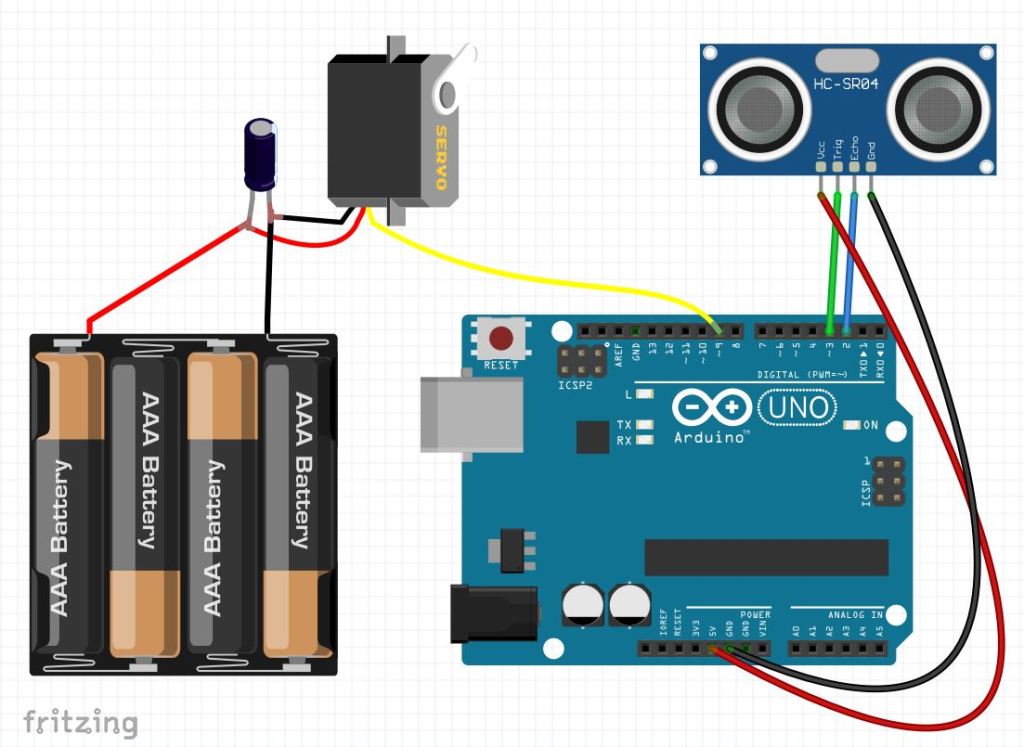
For us it was better to use an extra battery pack for the servomotor. But it can run using the power outputs from the Arduino too. The Arduino uses a 9V battery (not shown in the picture).
The puppy was made using origami, following the book „Origami. Kinderleichte Falt-Ideen“ by Miyuki Lacza.
Here is the code:
#include <Servo.h>int servoPin = 9;int pinEcho = 2;int pinTrigger = 3;int distance;unsigned long currentMillis=0;Servo mvservo;void setup() { // put your setup code here, to run once: mvservo.attach(servoPin,1000,1500); Serial.begin(9600); pinMode(pinTrigger, OUTPUT); pinMode(pinEcho, INPUT); mvservo.writeMicroseconds(1500);}void loop() { // put your main code here, to run repeatedly: distance = d_sensor(); if((distance < 50)&&(distance > 25)){ wiggleTail(1500); }if((distance <= 25)&&(distance > 0)){ wiggleTail(200); }//add more cases if you want...}/**************** FUNCTIONS ******************/float d_sensor (){long t_resp; long Abstand; digitalWrite(pinTrigger,LOW); delayMicroseconds(3); digitalWrite(pinTrigger,HIGH); delayMicroseconds(10); t_resp = pulseIn(pinEcho,HIGH); Abstand = int(t_resp*0.0342/2); Serial.println("Distance = "); Serial.println(Abstand); Serial.println(" cm"); delay(100); return Abstand;}void wiggleTail(int interval){unsigned long currentMillis; for(int i = 1500; i >= 1000; i-=25){ mvservo.writeMicroseconds(i); delay(10); } delay(interval); /*currentMillis = millis(); while(millis() < currentMillis + interval){ }*/ for(int i = 1000; i <= 1500; i+=25){ mvservo.writeMicroseconds(i); delay(10); }}
You could also use the map() function to translate distance to servo-delay, but these values worked out better for our puppy.


Kommentar verfassen